creel survey, fisheries, design-based inference, R, tidycreel, Quarto
Raw creel data rarely arrives in the column names that tidycreel expects. Agency database exports use names shaped by legacy systems — SurveyDate instead of date, InterviewID instead of interview_id, EffortHours instead of hours_fished. Before any estimation can begin, these raw names must be translated to the canonical form the package understands.
tidycreel.connect handles this translation. It is a companion package that wraps a connection to your data source — flat CSV files, a SQL Server database, or a REST API — and renames columns to tidycreel’s canonical names automatically. The rest of your analysis code never needs to know where the data came from.
This chapter covers:
Creating a column-mapping schema with creel_schema()
Connecting to CSV files with creel_connect() and creel_connect_from_yaml()
Connecting to a SQL Server database with creel_connect_from_yaml()
Connecting to a REST API with creel_connect_api()
Fetching interview, count, catch, and length data
Validating loaded data before analysis begins
Code
# Install tidycreel.connect from source alongside tidycreel# R CMD INSTALL /path/to/tidycreel/tidycreel.connect## Or from GitHub after the package is published:# remotes::install_github("chrischizinski/tidycreel", subdir = "tidycreel.connect")
17.1 The translation problem
Every agency that runs creel surveys has its own database schema. A decade of Microsoft Access, SQL Server, and flat-file exports produces column names like CD_Date, II_UID, Num, and ii_TripType. These are meaningful in context, but they are not what estimate_effort() or add_interviews() expect.
Manual renaming with dplyr::rename() is fragile. It must be repeated every time data are loaded, it is invisible to collaborators who receive only the R scripts, and it breaks silently when the agency renames a field. A schema-based connection layer solves all three problems: the mapping is declared once, in a readable configuration file, and applied consistently every time data are fetched.
The schema-to-connection-to-fetch workflow is:
Declare the column mapping in creel_schema() — once per project
Create a connection with creel_connect(), creel_connect_from_yaml(), or creel_connect_api()
Load data with fetch_interviews(), fetch_counts(), fetch_catch(), etc.
All downstream tidycreel calls use canonical column names
17.2 The schema as column map
creel_schema() takes two kinds of arguments: the survey type and a set of column mapping arguments that translate agency names to tidycreel canonical names. Each mapping argument has the form canonical_name_col = "AgencyColumnName".
The example below builds the schema for a hypothetical agency export of Harlan Reservoir data. In this export, the agency uses InterviewID, SurveyDate, HoursFished, and TripStatus instead of tidycreel’s canonical interview_id, date, hours_fished, and trip_status.
Code
schema <-creel_schema(survey_type ="instantaneous",# Interview table column mapping (agency name on right, canonical name implied by argument)interview_uid_col ="InterviewID",date_col ="SurveyDate",effort_col ="HoursFished",catch_col ="TotalCatch",trip_status_col ="TripStatus",# Count tablebank_anglers_col ="BankAnglers",angler_boats_col ="AnglerBoats",count_time_col ="CountTime",# Catch tablecatch_uid_col ="CatchUID",species_col ="SpeciesCode",catch_count_col ="CatchCount",catch_type_col ="CatchType",# Lengths tablelength_uid_col ="LengthUID",length_mm_col ="LengthMM",length_type_col ="LengthType")schema
The schema prints as a readable mapping: each canonical name appears on the left with its agency counterpart on the right. A slot left as NULL declares nothing about that field, which has one of two consequences. If the export happens to name the column exactly what tidycreel names it, the fetch takes it anyway and reports which columns it took that way — n_anglers and angler_type below arrive by that route, undeclared. If the export calls it something else, nothing connects the two names and the column is dropped, leaving it unavailable for domain analysis (see Section 16.8 for the estimation consequences of missing fields). Declaring the mapping states the intent either way, and silences the report.
Table 17.1: Column name mapping from agency export format to tidycreel canonical names. The canonical name is the column name returned by fetch functions and expected by tidycreel estimation functions. The schema argument is the creel_schema() parameter that declares the mapping. A column is extracted when the schema maps it, or when the export already uses the canonical name; anything else is dropped.
Canonical name (fetch output)
Schema argument
Agency export name
Table
interview_uid
interview_uid_col
InterviewID
interviews, catch, lengths
date
date_col
SurveyDate
interviews, counts
effort
effort_col
HoursFished
interviews
catch_count
catch_col
TotalCatch
interviews
trip_status
trip_status_col
TripStatus
interviews
bank_anglers
bank_anglers_col
BankAnglers
counts
angler_boats
angler_boats_col
AnglerBoats
counts
count_time
count_time_col
CountTime
counts
catch_uid
catch_uid_col
CatchUID
catch
species
species_col
SpeciesCode
catch, lengths
catch_count
catch_count_col
CatchCount
catch
catch_type
catch_type_col
CatchType
catch
length_uid
length_uid_col
LengthUID
lengths
length_mm
length_mm_col
LengthMM
lengths
length_type
length_type_col
LengthType
lengths
With the schema declared, the next step is creating a connection to the actual data source. The sections below cover the three backends in turn: CSV files, SQL Server, and REST API.
17.3 The CSV backend
Creating CSV files from an agency export
The most common starting point is a set of CSV exports from an agency database. To demonstrate the full workflow, the code below simulates this scenario: it takes the Harlan Reservoir data (which already uses canonical column names) and renames columns to agency-style names before writing to CSV. In a real project, your agency provides these files directly.
Code
# Summarize catch per interview for the interview-level totalcatch_per_interview <- harlan_catch |>group_by(interview_id) |>summarise(TotalCatch =sum(n_fish, na.rm =TRUE), .groups ="drop")# Rename Harlan interview columns to agency-style namesagency_interviews <- harlan_interviews |>left_join(catch_per_interview, by ="interview_id") |>mutate(TotalCatch =coalesce(TotalCatch, 0L)) |>rename(InterviewID = interview_id,SurveyDate = date,HoursFished = hours_fished,TripStatus = trip_status )# Rename count columnsagency_counts <- harlan_counts |>rename(SurveyDate = date,CountTime = count_time,BankAnglers = bank_anglers,AnglerBoats = angler_boats )# Rename catch columnsagency_catch <- harlan_catch |>rename(InterviewID = interview_id,SpeciesCode = species,CatchCount = n_fish,CatchType = catch_type ) |>mutate(CatchUID =row_number(), .before =1)# Write to a temporary directory (in practice, use your project's data/ folder)data_dir <-tempdir()write_csv(agency_interviews, file.path(data_dir, "harlan_interviews.csv"))write_csv(agency_counts, file.path(data_dir, "harlan_counts.csv"))write_csv(agency_catch, file.path(data_dir, "harlan_catch.csv"))# Empty length tables — Harlan 2022 did not collect length dataempty_lengths <-tibble(LengthUID =integer(0), InterviewID =character(0),SpeciesCode =character(0), LengthMM =numeric(0), LengthType =character(0))write_csv(empty_lengths, file.path(data_dir, "harlan_harvest_lengths.csv"))write_csv(empty_lengths, file.path(data_dir, "harlan_release_lengths.csv"))
Connecting with creel_connect()
With the agency CSV files in place and the schema defined, create a connection by passing a named list of file paths:
The conn object holds the file paths, the schema, and the backend type. It does not read any data yet. File existence is checked at connection time so that missing files surface immediately — before you have run several processing steps and then hit an error.
17.4 Fetching data
fetch_interviews()
fetch_interviews() reads the interviews CSV, renames columns using the schema, coerces types, and validates the result. A column is kept when the schema maps it, and also when the export already names it exactly what tidycreel names it — the fetch reports the ones it took that way. Everything else is dropped, and reported too.
Code
interviews <-fetch_interviews(conn)
ℹ interviews: taking 2 columns by canonical name, with no schema entry.
ℹ Columns: n_anglers and angler_type.
ℹ Declaring them in `tidycreel::creel_schema()` states the mapping explicitly
  and silences this.
ℹ interviews: 6 source columns not carried through: reservoir, day_type,
  period, section, party_id, and angler_method.
  Map what you need downstream via `creel_schema` in
  `tidycreel::creel_schema()`.
The returned data frame has canonical column names (interview_uid, date, effort, trip_status) regardless of what the agency CSV called them. If the agency schema includes a catch_count_col mapping, a catch_count column is also returned; otherwise catch totals come from fetch_catch() (see below). For the NGPC REST API backend, catch is in a separate endpoint (GetCatchData) and is never present in the interviews table — use fetch_catch() to retrieve it.
fetch_counts()
fetch_counts() follows the same pattern: reads, renames, coerces, and returns a data frame with canonical column names.
Code
counts <-fetch_counts(conn)
ℹ counts: 5 source columns not carried through: reservoir, day_type, period,
  section, and boat_anglers.
  Map what you need downstream via `creel_schema` in
  `tidycreel::creel_schema()`.
Each row is one count event. The bank_anglers and angler_boats columns retain the same names regardless of what the agency CSV called them — the schema mapping applied on read.
fetch_catch()
fetch_catch() returns the long-format catch table: one row per species × catch type × interview. The catch_uid column is synthesized as a row index when the source data does not include one.
Code
catch <-fetch_catch(conn)catch
# A tibble: 987 × 5
   catch_uid interview_uid species         catch_count catch_type
   <chr>     <chr>         <chr>                 <dbl> <chr>
 1 1         1             White Bass               11 released
 2 2         1             White Bass               32 harvested
 3 3         1             Yellow Perch              1 released
 4 4         1             Walleye                   0 released
 5 5         4             White Bass                9 harvested
 6 6         4             Freshwater Drum           3 released
 7 7         5             White Bass                0 harvested
 8 8         6             Freshwater Drum           5 released
 9 9         8             White Bass                6 harvested
10 10        8             Freshwater Drum           1 released
# ℹ 977 more rows
Species codes arrive as character even when the source stores them as integers — the fetch function coerces on read so downstream standardize_species() calls receive consistent input.
fetch_harvest_lengths() and fetch_release_lengths()
Length data follow the same pattern. When the lengths table is empty — as in Harlan 2022 — the fetch functions return a zero-row data frame with the correct column types, which is the expected input to add_lengths().
Code
harvest_lengths <-fetch_harvest_lengths(conn)release_lengths <-fetch_release_lengths(conn)nrow(harvest_lengths) # 0 — no length data for Harlan 2022
[1] 0
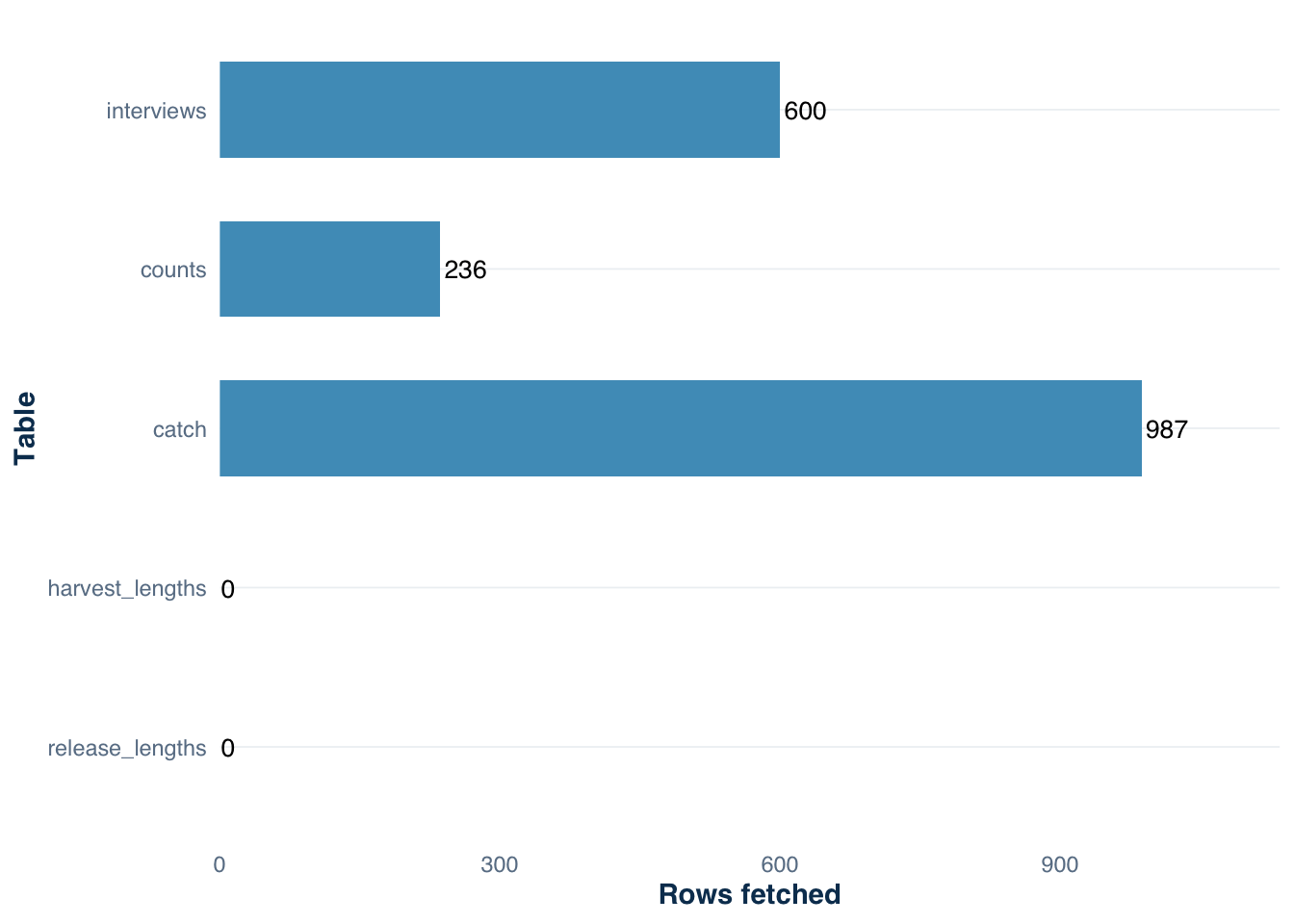
Figure 17.1 shows the row counts across all five fetched tables, confirming that the agency export was read completely and the empty length tables are structurally correct.
Figure 17.1: Row counts per table fetched from the Harlan Reservoir 2022 agency export via tidycreel.connect. The 987 catch records link to 600 interviews via interview_uid. Empty length tables reflect that biological measurements were not collected in this survey.
17.5 YAML-based connections
For reproducible workflows, declare the data source and schema in a YAML configuration file rather than inline R code. creel_connect_from_yaml() reads the file and builds the connection object. The schema and file paths live in version control; credentials do not.
CSV backend config
Create a file named creel-config.yml in your project root:
For SQL Server connections, add a sqlserver block with connection details. Credentials must never appear as plain text in the YAML file — use environment variables with the config package’s !expr tag:
# In ~/.Renviron (never commit this file to version control):# CREEL_USER=your_agency_username# CREEL_PASS=your_password## Or set programmatically in the session:Sys.setenv(CREEL_USER ="your_username", CREEL_PASS ="your_password")conn_prod <-creel_connect_from_yaml("creel-config.yml")
creel_connect_from_yaml() validates the YAML before attempting any network connection. If required keys are missing, if the backend value is unrecognized, or if the environment variables resolve to empty strings, the function aborts immediately with a descriptive error listing every problem at once.
Multiple environments
The config argument lets you switch between a CSV development environment and a SQL Server production environment using a single YAML file:
# Local CSV for developmentconn_dev <-creel_connect_from_yaml("creel-config.yml")# Production SQL Serverconn_prod <-creel_connect_from_yaml("creel-config.yml", config ="production")
This pattern ensures that the analysis code remains identical across environments — only the connection changes.
17.6 SQL Server authentication
Two authentication modes are supported:
auth_type
Platforms
Notes
password
Windows, macOS, Linux
Requires username + password
windows
Windows only
Uses domain credentials; no password needed
Windows integrated authentication (auth_type: windows) is the most secure option for Windows users on a domain. On macOS or Linux, use auth_type: password with credentials from environment variables.
The SQL Server backend requires the odbc R package and a native ODBC driver. Call creel_check_driver() to confirm the driver is installed and registered before attempting a connection:
Code
creel_check_driver()# ✔ ODBC Driver 17 for SQL Server found# ✔ odbc package available
Installation instructions for the ODBC Driver 17 for SQL Server are in the tidycreel.connect README (Windows, macOS, and Linux).
For agencies that serve creel data over HTTP rather than through a database, tidycreel.connect provides a third backend described in the next section.
17.7 The REST API backend
Some state agencies expose creel data through a REST API rather than a database or flat files. tidycreel.connect supports this with creel_connect_api(), which queries a JSON-returning endpoint and applies the same fetch_*() interface used by the CSV and SQL Server backends.
The default endpoint paths are designed for the UNL/NGPC creel survey API. Agencies running a compatible service can connect with no configuration beyond a base URL and a survey UID. Agencies with different endpoint paths can override them individually.
No-auth connection
The simplest API connection requires only a base URL, one or more creel survey UIDs, and a schema. The schema supplies survey_type; JSON field-name translation defaults to the NGPC response format. Agencies whose API returns different field names can override them with the api_field_map argument, shown in Section 17.7.4 below.
Two authentication modes are supported via the auth argument.
Bearer token — used by most modern agency REST APIs:
Code
# Add to ~/.Renviron (never store tokens as plain strings in R scripts):# CREEL_API_TOKEN=your_token_here# Then restart R so Sys.getenv() resolves it.conn_api <-creel_connect_api(base_url ="https://api.example.com/creel/",creel_uids ="survey-uid-001",schema = schema,auth =list(type ="bearer", token =Sys.getenv("CREEL_API_TOKEN")))
API key — passed as a custom request header:
Code
conn_api <-creel_connect_api(base_url ="https://api.example.com/creel/",creel_uids ="survey-uid-001",schema = schema,auth =list(type ="api_key",key =Sys.getenv("CREEL_API_KEY"),header ="X-API-Key"# header name your agency requires ))
Store credentials in ~/.Renviron (never commit that file to version control):
If your agency runs a REST API that returns the same JSON structure but at different paths, override specific endpoints without changing the others:
Code
conn_api <-creel_connect_api(base_url ="https://api.example.com/",creel_uids ="survey-001",schema = schema,uid_param ="survey_id", # query parameter name your API expectsendpoints =list(interviews ="v2/interviews",counts ="v2/counts",catch ="v2/catch" ))
Valid endpoint names are interviews, counts, catch, harvest_lengths, and release_lengths. Unspecified endpoints retain the NGPC defaults.
Configuring JSON field names
By default, creel_connect_api() translates NGPC JSON field names (ii_UID, cd_Date, ii_TripType, …) into tidycreel canonical names. Agencies that serve a compatible JSON structure with different field names supply an api_field_map override — a named list keyed by endpoint, each entry mapping a canonical column name to its JSON field name. Unspecified entries retain their NGPC defaults.
Code
# Agency API uses different JSON field names than NGPCconn_api <-creel_connect_api(base_url ="https://api.example.com/creel/",creel_uids ="survey-uid-001",schema = schema,api_field_map =list(interviews =list(interview_uid ="interview_id", # not "ii_UID"date ="survey_date", # not "cd_Date"trip_status ="trip_type"# not "ii_TripType" ),counts =list(bank_anglers ="bank_count", # not "c_BankAnglers"angler_boats ="boat_count"# not "c_AnglerBoats" ) ))
If you pass column-mapping arguments to creel_schema() (such as interview_uid_col, date_col) without also supplying api_field_map, the function will emit a warning: schema column mappings configure CSV/SQL column names and are ignored by the API backend. Use api_field_map for API JSON field name translation.
Fetching from an API connection
After creating the connection, the fetch_*() calls are identical to the CSV workflow:
The returned data frames have the same canonical column names regardless of backend. Code written for CSV development runs against an API connection in production without modification.
Note: creel_connect_from_yaml() does not currently support the API backend. API connections must be constructed with creel_connect_api() directly.
17.8 After fetching: validate before analyzing
After fetching all tables, run validate_creel_data() to confirm cross-table integrity. This catches problems that single-table fetch validation cannot detect: interview IDs in the catch table that have no matching interview record, dates that fall outside the schedule frame, and count records on days with no corresponding interviews.
── Creel Data Validation ───────────────────────────────────────────────────────
33 pass | 0 warn | 0 fail
── Table: counts ──
✔ date
✔ type: class: Date
✔ na_rate: 0 / 232 NA (0%)
✔ date_range: all within 1970-01-01 - 2100-12-31
✔ count_time
✔ type: class: character
✔ na_rate: 0 / 232 NA (0%)
✔ empty_strings: none
✔ bank_anglers
✔ type: class: numeric
✔ na_rate: 0 / 232 NA (0%)
✔ negative_values: none
✔ angler_boats
✔ type: class: numeric
✔ na_rate: 0 / 232 NA (0%)
✔ negative_values: none
── Table: interviews ──
✔ interview_uid
✔ type: class: character
✔ na_rate: 0 / 600 NA (0%)
✔ empty_strings: none
✔ date
✔ type: class: Date
✔ na_rate: 0 / 600 NA (0%)
✔ date_range: all within 1970-01-01 - 2100-12-31
✔ catch_count
✔ type: class: numeric
✔ na_rate: 0 / 600 NA (0%)
✔ negative_values: none
✔ effort
✔ type: class: numeric
✔ na_rate: 0 / 600 NA (0%)
✔ negative_values: none
✔ trip_status
✔ type: class: character
✔ na_rate: 0 / 600 NA (0%)
✔ empty_strings: none
✔ n_anglers
✔ type: class: numeric
✔ na_rate: 0 / 600 NA (0%)
✔ negative_values: none
✔ angler_type
✔ type: class: character
✔ na_rate: 0 / 600 NA (0%)
✔ empty_strings: none
The validator returns a structured report, not a silent pass/fail. Each check is named, and failures include the offending rows. Review the report before proceeding to creel_design().
17.9 From connection to analysis
The fetch functions return plain data frames with canonical tidycreel column names. These are the same objects that Section 18.1, Section 19.1, and Section 20.1 use directly from .rds files. The only difference is origin: CSV files through a connection vs. pre-packaged R data objects.
Code
# After fetch, the data are identical to what creel_design() expectsharlan_schedule <-readRDS("data/harlan_schedule.rds")design <-creel_design(harlan_schedule, date = date, strata = day_type)design <-add_interviews( design, interviews, # fetched from CSV via tidycreel.connectcatch = catch_count,effort = effort,trip_status = trip_status)
Section 18.1 and Section 19.1 walk through the complete construction of a creel_design object. Section 21.1 begins the estimation sequence. The connection layer described in this chapter is the upstream step that ensures all of those functions receive data in the shape they expect.
17.10 Takeaway
Data in a SQL Server table, a folder of CSV files, or a REST API endpoint is not yet ready for tidycreel. tidycreel.connect provides the translation layer — schema-based column renaming, type coercion, and validation — that converts agency data formats into the canonical input that all estimation functions expect. Declaring the translation once, in a creel_schema() call or a YAML file, keeps the mapping explicit, version-controllable, and reusable across seasons.